> For the complete documentation index, see [llms.txt](https://docs.noqo.ai/llms.txt). Markdown versions of documentation pages are available by appending `.md` to page URLs; this page is available as [Markdown](https://docs.noqo.ai/actions/file-processing.md).

# File processing

This functionality allows you to extract text from a file that the client sent in a dialog.

### What's it for?

* The client can send files in docx, pdf, rtf, txt or any other format;
* The bot will be able to process the file, or pass the result from the file to other action steps.

### Creating an action to extract text from a file

{% stepper %}
{% step %}

### Go to the “Workflows” section and click the “Create” button

<figure><img src="https://1782981877-files.gitbook.io/~/files/v0/b/gitbook-x-prod.appspot.com/o/spaces%2FKvUDH16L29QcaH0CuUhn%2Fuploads%2FIWWiikALZnXHO165TWSM%2Fimage.png?alt=media&amp;token=d9d3877c-7273-4e3f-b0e8-0a861e856560" alt=""><figcaption></figcaption></figure>
{% endstep %}

{% step %}

### Select the type of step

<figure><img src="https://1782981877-files.gitbook.io/~/files/v0/b/gitbook-x-prod.appspot.com/o/spaces%2FKvUDH16L29QcaH0CuUhn%2Fuploads%2FKTGF80P4lALD2iFhP8qK%2Fimage.png?alt=media&amp;token=a8eaad76-480e-4d39-9558-8ffb3bf73d83" alt=""><figcaption></figcaption></figure>

{% endstep %}

{% step %}

### Go to Workflows Settings

<figure><img src="https://1782981877-files.gitbook.io/~/files/v0/b/gitbook-x-prod.appspot.com/o/spaces%2FKvUDH16L29QcaH0CuUhn%2Fuploads%2FcZ6XyfV8Kwt22r8vOhQD%2Fimage.png?alt=media&amp;token=5225e395-d119-4e17-83dd-8e46d382de59" alt=""><figcaption></figcaption></figure>

| **Name of action**              | Display name, by which you can easily identify the desired action in the general list.                                                                                                                                                               |
| ------------------------------- | ---------------------------------------------------------------------------------------------------------------------------------------------------------------------------------------------------------------------------------------------------- |
| **Function name**               | <p>Must describe the main meaning of the action.<br>Only English characters and underscores are allowed (<code>\_</code>)</p>                                                                                                                        |
| **Function description**        | A description of what the action will do                                                                                                                                                                                                             |
| **Error message**               | What text will be returned to the bot when an error occurs. We recommend to put something like “An error occurred” in it                                                                                                                             |
| **Rules for replying to a bot** | <p>Several webhooks can be called or other functions can be performed within one action.</p><p>With this setting, we have the ability to choose whether the response from the first step, the last step, or all steps will be passed to the bot.</p> |
| {% endstep %}                   |                                                                                                                                                                                                                                                      |

{% step %}

### Fill in the blanks:

<figure><img src="https://1782981877-files.gitbook.io/~/files/v0/b/gitbook-x-prod.appspot.com/o/spaces%2FKvUDH16L29QcaH0CuUhn%2Fuploads%2Fsn35m8BeuuJbcUtwRKhA%2Fimage.png?alt=media&amp;token=ffc6ef7c-13a1-4402-a9df-0997b0c89f28" alt=""><figcaption></figcaption></figure>

{% hint style="info" %}
To automatically generate a Function Name, fill in the Action Name field and click the auto-generate button to the right of the Function Name field.
{% endhint %}
{% endstep %}

{% step %}

### Add an Action Argument by clicking the Add button  below

<figure><img src="https://1782981877-files.gitbook.io/~/files/v0/b/gitbook-x-prod.appspot.com/o/spaces%2FKvUDH16L29QcaH0CuUhn%2Fuploads%2FKdcRf7m4Q0BpDc8cXsp2%2Fimage.png?alt=media&amp;token=43ca4b25-f3f3-4432-8a6d-a249b5e26137" alt=""><figcaption></figcaption></figure>
{% endstep %}

{% step %}

### Fill in the fields in the “Action Arguments” section

<figure><img src="https://1782981877-files.gitbook.io/~/files/v0/b/gitbook-x-prod.appspot.com/o/spaces%2FKvUDH16L29QcaH0CuUhn%2Fuploads%2FQ3erOAaTm6EKD4376BqY%2Fimage.png?alt=media&amp;token=302861dc-ea6b-42ae-b2a0-a4d8ae291cfe" alt=""><figcaption></figcaption></figure>

{% hint style="info" %}
**Argument** - since the argument for the function is any document, we write file in the Argument field **`file`**

**Argument description** - this field is optional and serves as a description to avoid confusion if there are several arguments.

**Type** - since this step supports only arguments-files, choose “Document”.
{% endhint %}
{% endstep %}

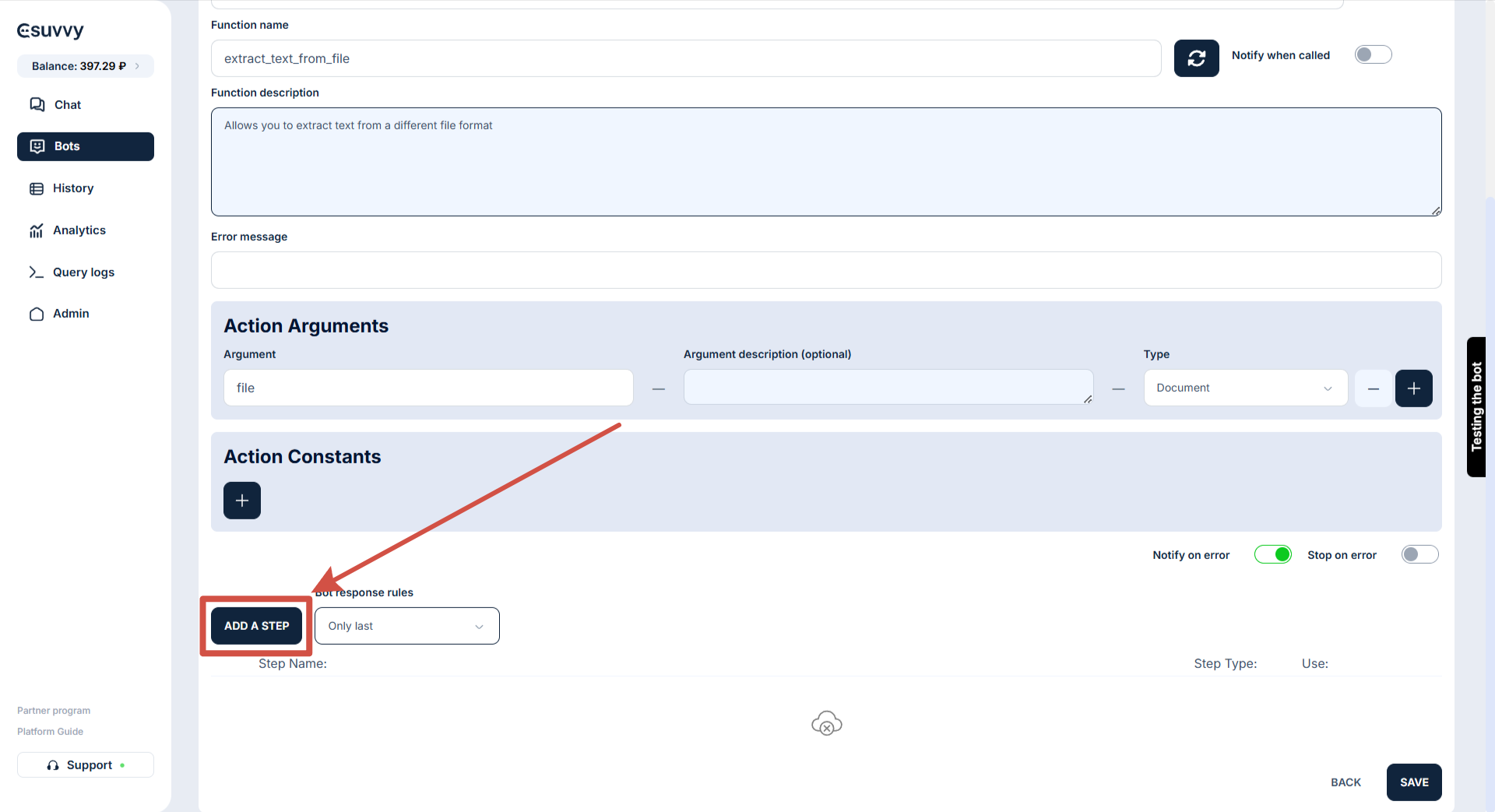
{% step %}

### Add a step by clicking on the “Add Step” button

<figure><img src="https://content.gitbook.com/content/KvUDH16L29QcaH0CuUhn/blobs/2kRuzGxlYTe41krbR266/2025-04-29_08-29-29.png" alt=""><figcaption></figcaption></figure>
{% endstep %}

{% step %}

### In the menu for setting the step from the drop-down menu, select the “file” argument.&#x20;

<figure><img src="https://1782981877-files.gitbook.io/~/files/v0/b/gitbook-x-prod.appspot.com/o/spaces%2FKvUDH16L29QcaH0CuUhn%2Fuploads%2Fuy5kuH7AcZzjY6mzqDCi%2Fimage.png?alt=media&amp;token=93fcb465-c10a-417c-ab9d-30dd087e4ebe" alt=""><figcaption></figcaption></figure>

{% hint style="info" %}
**Name** - filled in automatically when selecting the step type.

**Argument in which the file will be transferred** - select the appropriate argument from the drop-down menu.

**Put the received text into a variable** - allows you to pass the received text to other steps.

**Scanned text reading mode** - allows you to use the so-called “Smart reading of files and pictures”. If the action sent a scan in pdf (not text) or word with pictures, this mode will be able to read these files as text. Price - 0.5 rubles per page.
{% endhint %}
{% endstep %}

{% step %}

### Click on the “Save” button to save the action.

<figure><img src="https://1782981877-files.gitbook.io/~/files/v0/b/gitbook-x-prod.appspot.com/o/spaces%2FKvUDH16L29QcaH0CuUhn%2Fuploads%2FSMCPyKI3YcTxtFjEHsLy%2Fimage.png?alt=media&amp;token=78321eb3-d8f1-43d5-af38-0169ca63557d" alt=""><figcaption></figcaption></figure>
{% endstep %}

{% step %}

### Setup is complete.

<figure><img src="https://1782981877-files.gitbook.io/~/files/v0/b/gitbook-x-prod.appspot.com/o/spaces%2FKvUDH16L29QcaH0CuUhn%2Fuploads%2Fj6YG1qeSsl1cwINFGdAa%2Fimage.png?alt=media&amp;token=8e57421c-b1c5-4002-b11b-9ca2da2ef9c8" alt=""><figcaption></figcaption></figure>
{% endstep %}
{% endstepper %}